
Android 16 Desktop Mode: Can a Smartphone Replace a Work Laptop?
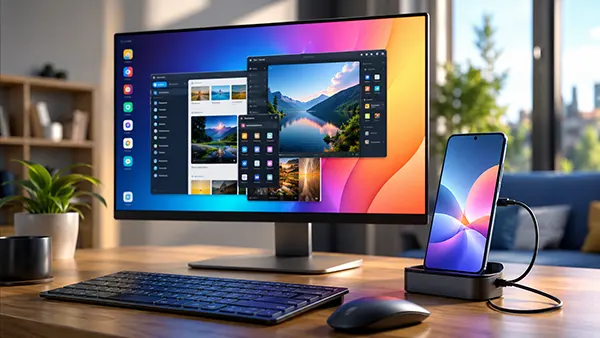
For years, smartphone manufacturers have promoted the idea that a modern handset can do far more than make calls, send messages, or run mobile apps. The release of Android 16 has brought renewed attention to this concept thanks to major improvements in Desktop Mode, a feature designed to provide a computer-like workspace when a smartphone is connected to an external display. In 2026, flagship Android devices offer powerful processors, large memory configurations, advanced multitasking capabilities, and support for keyboards, mice, and monitors. The question is no longer whether a smartphone can perform professional tasks, but whether Android 16 Desktop Mode is mature enough to replace a traditional work laptop for everyday productivity. The answer depends on the type of work being performed, the software requirements involved, and the expectations of the user.
What Is Android 16 Desktop Mode and How Does It Work?
Android 16 Desktop Mode is Google’s most advanced attempt to transform a smartphone into a desktop computing environment. When a compatible device is connected to an external monitor through USB-C or wireless display technology, Android automatically launches a desktop-style interface featuring resizable windows, a taskbar, multiple running applications, and improved mouse and keyboard support. The environment resembles a lightweight operating system rather than the traditional full-screen mobile experience familiar to Android users.
The concept itself is not entirely new. Samsung introduced DeX several years ago, while Motorola and Huawei experimented with similar desktop environments. What makes Android 16 significant is Google’s direct integration of desktop functionality into the core operating system. This approach reduces fragmentation and allows developers to optimise applications specifically for desktop-style workflows without relying on manufacturer-specific solutions.
Modern flagship smartphones equipped with processors such as the Snapdragon 8 Elite series, Tensor G5, or MediaTek Dimensity 9500 provide enough computing power to handle multitasking workloads. Tasks including document editing, web browsing with dozens of tabs, video conferencing, email management, and cloud-based collaboration tools can now be performed smoothly within the Android desktop environment.
Key Improvements Introduced in Android 16
One of the most important upgrades is improved window management. Users can resize, minimise, maximise, and organise applications more efficiently than in previous Android versions. This creates a workflow that feels significantly closer to Windows, macOS, or ChromeOS.
Google has also enhanced peripheral support. External keyboards now offer better shortcut integration, while mice provide more precise cursor control. Multi-monitor support has expanded on supported hardware, allowing professionals to organise applications across larger workspaces and improve productivity.
Application compatibility has improved considerably as well. Many productivity tools now recognise desktop environments and automatically adapt their layouts. Office suites, project management tools, communication software, and cloud storage services benefit from larger interfaces that take advantage of external displays.
Can Android 16 Desktop Mode Handle Professional Work?
For many office-based roles, Android 16 Desktop Mode is surprisingly capable. Professionals who primarily work with email, cloud documents, spreadsheets, presentations, project management platforms, and web applications may find that a flagship smartphone can complete nearly all daily responsibilities. Services such as Microsoft 365, Google Workspace, Slack, Zoom, Teams, Notion, Trello, and Asana function effectively within Android’s desktop environment.
Remote work has accelerated the adoption of browser-based software. Many businesses now rely on cloud infrastructure rather than locally installed desktop applications. This shift benefits Android Desktop Mode because modern web applications require less dependence on traditional laptop operating systems. A stable internet connection often matters more than the hardware itself.
Content creators can also perform a range of tasks using mobile software. Photo editing applications, social media management tools, content planning systems, and lightweight video editing solutions have become increasingly sophisticated. Some creators may complete entire workflows without needing a laptop, particularly when content is intended for mobile-first audiences.
Areas Where Smartphones Still Face Limitations
Despite substantial progress, Android 16 Desktop Mode cannot fully replace a laptop for every profession. Software developers often require specialised development environments, virtual machines, local servers, and advanced debugging tools that remain difficult or impossible to run natively on Android devices.
Professional video editors, 3D designers, architects, engineers, and data scientists frequently depend on resource-intensive desktop software. Applications such as Adobe Premiere Pro, DaVinci Resolve, AutoCAD, SolidWorks, Blender, and advanced analytics platforms continue to rely on operating systems designed specifically for desktop computing.
File management remains another challenge. Although Android has improved dramatically, managing complex folder structures, external storage devices, enterprise networks, and advanced workflows can still feel more restrictive than on Windows or macOS. Power users who regularly work with large datasets or specialised file systems may encounter limitations.
The Future of Mobile Computing Beyond Traditional Laptops
The growing capabilities of Android Desktop Mode reflect broader industry trends. Hardware manufacturers increasingly focus on convergence, where a single device serves multiple purposes. Instead of carrying a smartphone, tablet, and laptop separately, users may rely on one powerful device connected to different accessories depending on the situation.
Artificial intelligence is accelerating this transition. Android 16 integrates advanced AI features that assist with document creation, content summarisation, communication, task organisation, and productivity management. As AI reduces manual workload, the performance gap between smartphones and laptops becomes less important for many users.
Cloud computing also plays a major role. Remote desktop services, cloud workstations, browser-based software, and virtual computing environments allow users to access powerful resources regardless of the local hardware. In such scenarios, the smartphone functions primarily as an access point rather than the sole computing device.
Who Can Replace a Laptop with Android 16 Today?
Business travellers represent one of the strongest use cases. Instead of carrying a laptop, they can connect a smartphone to a hotel television or portable monitor and access productivity tools, video meetings, presentations, and business documents. This reduces travel weight while maintaining functionality.
Students can also benefit from Android Desktop Mode. Research, online learning, note-taking, collaboration tools, document creation, and presentation preparation can all be handled effectively on a modern flagship smartphone paired with a keyboard and monitor.
For professionals whose work revolves around browsers, cloud applications, communication platforms, and office software, Android 16 Desktop Mode may already serve as a realistic laptop replacement. However, users with specialised software requirements, heavy creative workloads, or advanced technical tasks will still find traditional laptops more versatile. Rather than completely replacing laptops in 2026, Android 16 Desktop Mode is expanding the number of situations where a smartphone can act as a capable primary work device.
Popular topics
-
 Satellite Connectivity in S...
For decades, losing mobile coverage meant losing almost every …
-
 Delta Force Mobile in 2026:...
Delta Force Mobile has two core multiplayer experiences that …
-
 How Modern Browsers Use Har...
Modern browsers no longer rely on the CPU for …
-
 RISC-V for a Home PC in 202...
RISC-V has moved beyond research boards and small embedded …
-
Android 16 Desktop Mode: Ca...
For years, smartphone manufacturers have promoted the idea that …